Homework H03
FinCalc - A Simple Financial Calculator
Learning Goal
Learning basic coding commands in VBA by creating a simple financial app.
Task
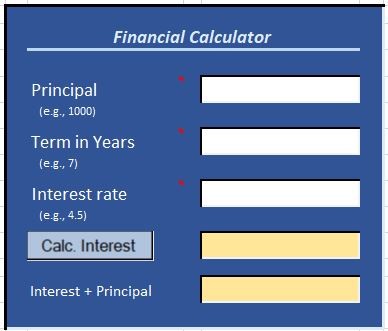
Implement the Simple Financial Calculator described by the UML Activity Diagram in the lecture slides and the vLab below. Use Visual Studio and VBA (i.e, do not use Excel formulas in the cells). The goal of this exercise is to
get you started with VBA.
Assume a non-malicious user, i.e., somebody that may make data entry errors, but is not intentionally trying to break your app.
Criteria
Your app must satisfy the following requirements
- the app accepts in input the principal without the "$", years as integers, and interest rate as a percentage.
E.g., if the interest rate is 0.0475, enter 4.75
- the user interface (UI) must look like the picture above. Microsoft sometimes changes their color palettes and styles: it is Ok if the colors are close, even if not perfect.
- the output is professionally formatted. For example: 12350.6543467771 is not formatted well. By contrast, $12,350.65 is
- the program must run as described in the UML diagram. In particular, pay attention to the acceptable values for the user entries. Assume that 'years' is an integer with no decimals
- functionality must be achieved via code, not Excel formulas in the cells of the spreadsheet.
Hints and Tips
- Do not mute the video. The verbal explanations often provide critical context that you won’t get by simply watching the screen.
- Expect differences between vLabs and homework instructions. Sometimes the virtual labs leave parts for you to complete, and other times the homework text introduces additional or different requirements. This is intentional—it’s designed to make you think independently. Don’t follow the vLab blindly!
- There’s no single “correct” way to do Homework 3. Your coding style might be just as good or even better than what you see in the vLab. The key requirement is that your app works and meets the requirements, not that your code looks identical to the example.
- Creativity is encouraged in certain areas. While some tasks require close adherence to the example, others allow room for personalization. For this assignment, you can have fun with button captions and calculator dialogues. Give your app a personality—make it grumpy, apologetic, cheerful, or anything you like!
- Plan ahead—this vLab will take longer than the previous ones.