Contents
MP6: Pressley Ad Agency
The first consultant was fired. Will you?

Goal
Learning about optimizing (normalizing and de-normalizing) DB design for efficiency and ease of use.
Learning how to create tables and views, and insert and update records.
Context
You really like your new job at Pressley Ad. A nice change of industry after the work at the consulting
firm. You heard some rumors about the failure at creating the first DB for the company and expect that the
project will be given to you.
Indeed, on your first week at the Agency, the CIO approaches you at one of the high tables shared by the
analysts:
"Welcome to Pressley! I am so glad that you joined us. Did you hear about the DB project? The last
consultant we hired was a DISASTER! I told HR to hire from UVA, but no! They wanted to save money and hired
somebody from some other university…. BIG MISTAKE! The DB she built was just a dump of the Excel spreadsheet
we use to track our campaigns. Nothing worked the way it was supposed to. What a waste of time and money!"
"I see… just copying an Excel spreadsheet into a DB without any data modelling is usually not a good
practice."
"I would use stronger words than ‘not a good practice’.... Well…anyhow, I want you to fix it."
"I can do that. I know about good DB design."
"Great. Please do it. BUT I also want you to somehow preserve the old spreadsheet view. Too many
employees need these data and are confused by how DBs work. They do not know SQL, they cannot join tables…
that’s complicated stuff! The managers want to see our data in the old format, as a single table of
information."
"Yes, I can create a view that will look exactly like their old spreadsheet."
"Can you do that? That would be perfect!"
"No problem, boss. I am on it...."
Task
The Agency CIO wants a well-designed database to store the campaign data, AND she also wants a 'big table' view that contains all the info that the employees are used to see in their Excel spreadsheets. In other words, she wants her cake and eat it too. Good thing you know about normalization and SQL views!
Create an ADS notebook that contains the queries necessary to create and populate the tables and the view described below. Post the notebook by the due date in your myFiles folder. Filename for the notebook is "MP6 YourLastname.ipynb".
Criteria
Your SQL must 1) drop any table and view created by previous runs of your code (this is for grading), 2)
create the correct tables and view, inclusive of PKs and FKs, 3) populate them with the correct data, and
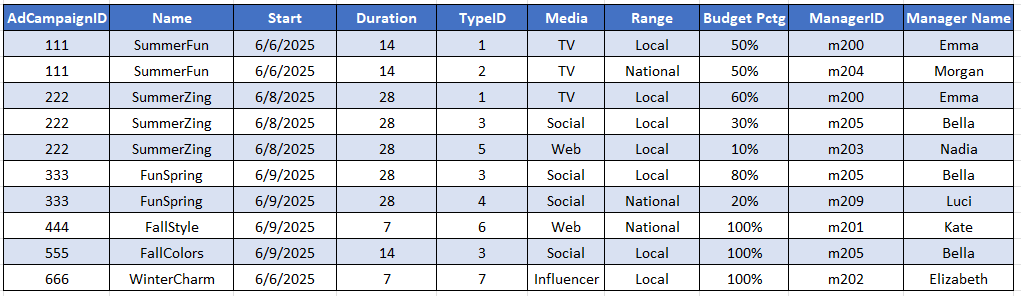
create and show a view that looks exactly like the picture below.
For all tables and views use the extended names. Extended names include your userid, e.g.,
fkg2s.AD_CAMPAIGN.
Building the Pressly DB
In class, you learned how to normalize tables by splitting them into several smaller tables. The W3 site has explanations and examples on SQL commands such as create table, create view, insert into, update, and delete records.
To build the Pressley DB, follow these steps:
1) Normalize the table below (3NF). Note that the table below has different logic and data than the one shown in class. Do all the tests and fixes for NF 1, 2 and 3. For guidance, see the deck for the class that covered Normalization, ask GenAI for help, or contact the professor.
2) Use the COMM3220 database (same server, userId and password).
Write in the notebook SQL statements that create the normalized tables. Pick data types that fit the
contents of the columns. For example, budget pct is stored as a number, and can be visualized as a
percentage, with a % sign.
Include all PKs and FKs. For all tables and views use the extended names that includes your userid, e.g.,
fkg2s.AD_CAMPAIGN.
3) Write SQL statements to fill the tables with the same data as in the figure below.
4) Add a query that changes the name of m202 to 'Bethel'.
5) Create a view called BIG_TABLE that joins the smaller tables and reproduces faithfully the denormalized big table as in the figure below, except that 'Elizabeth' will now be 'Bethel'. Visualize the exact same column names (use alias if necessary), same column order, same row order, same data and formats.
6) Write a Select * for the view
7) Write DROPs that delete the tables created in step 2 and the view from step 5 if they exist. Place this code at the top of your notebook, before the CREATEs (this is for the TA to grade). Make sure the DROPs work. Order matters: you cannot drop a table that has an active FK.
This exercise was inspired by the Jukic et al. DB book.