Contents
MP7: REI_not
Building and using a DW

Goal
Learning about Data Warehouses, including: DW design, creating tables, inserting data, and querying the DWs to create BI reports.
Context
Pressley was a fun but also stressful assignment. So you decided to leave Pressley and took a position as a
business analyst for REI_not. REI_not is a retailer that sells camping equipment. It is a more established
and more technologically sophisticated organization than Pressley and you thought that you could learn more
from them.
The CMO appears to be looking for you when he sees you walking down the hall at the company HQ.
"Ah! Here you are... didn't you go to UVA for your undergrad?"
"Yes...."
"Those Cavaliers are on fire this year, aren't they? Anyhow... Did you learn anything about Business
Intelligence? I want to slice and dice our sales data by store, by product, and by month. So far we have
been doing it in Excel and it is PAINFUL! We have to aggregate the data by hand. So many emails, so much
wasted time! There must be a better way to do it!"
"Yes, I know a little about BI, and yes, there is a better way to do it."
"I knew it! Excellent! You are the person I was looking for... our IT people are great at moving data
around, but they do not fully understand what I need to know to run our business."
"What you would like to know about the business?...."
"Ah yes, here: I wrote down a few examples of the kind of questions I would like to have answered" says he
while giving you a sheet of paper with a
few scribbled questions.
"Mmmm.... It looks like you need to integrate the data from our three stores and create reports from that.
We should build a Data Warehouse."
"A data.... what?"
"A technology to produce the reports you need."
"Yes, THAT! Can you build one of those and bring me my reports by next Monday?"
"I am on it, Boss..."
Task
Good news! The IT department at REI_not has already built ETL (Extract, Transfer and Load) technology to transfer data from the three REI_not stores to your centralized data warehouse at headquarters. These tables are called STORE1_DATA, STORE2_DATA and STORE3_DATA. They have also built a CALENDAR table for you. You can view all these tables in the COMM3220 database. Given the business questions asked by the CMO, you decide that line-item-level sales per day per product per store is a good design. Using mySQLWorkBench you quickly converge on the star schema below. Then you begin building your Data Warehouse.
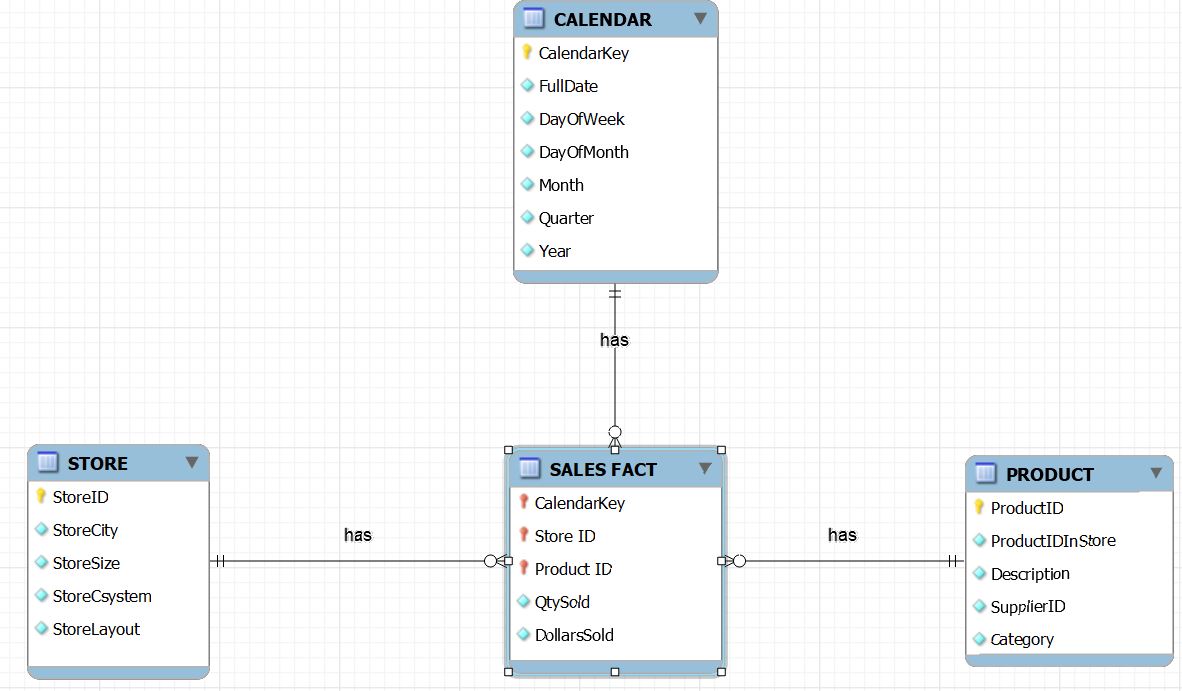
Use ADS to create a notebook that does the following:
1) Drop all the tables that YOU created in this exercise (but NOT the tables created by the REI_not IT
department). This is for grading.
2) Create and populate a dimension table for Product, based on the data below. Call it
<yourUserID>.PRODUCT
and include a PK
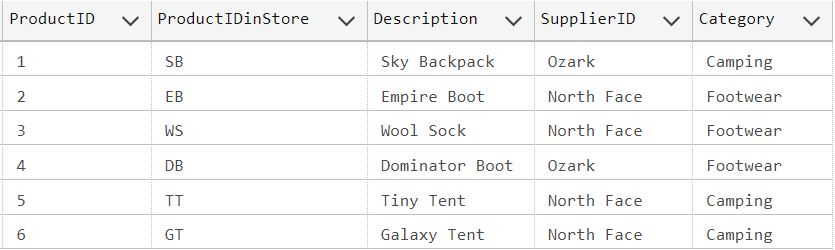
3) Create and populate a dimension table for Store, based on the data below. Call it <yourUserID>.STORE and include a PK

4) Create a new fact table called <yourUserID>.SALES_FACT, with FKs and PKs that contains all the
data from all the stores. To ensure a successful data transfer, the receiving table must have similar
datatypes as the source tables. Use ADS to explore the source tables and their columns. Load the data using
INSERT INTO.
5) Create queries that produce reports that answer the CMO questions. As in the past, list the number and
text of the questions, and the SQL queries that produce the corresponding results when run. One query per
notebook cell.
Name the notebook is "MP7 YourLastname.ipynb" and post it by the beginning of class in myFiles.
Criteria
Your SQL must produce the correct tables, populate them with the correct data, and drop them as needed.
Read carefully what is being asked. Your SQL must produce the correct answer and no unneeded extra data. If you are asked for a date, return a date, for a number, return a number, etc.
- One query per question
- If a question does not ask for specific columns, provide them all, except duplicates
- If asked to show data about a person or an item, always show their ID. For cities, use name and state
- Do not show duplicated records or columns
- All result columns must have an easy-to-understand name
- All dollar figures are formatted with ‘$’ and no cents. Integers have commas and no decimals. Percentages have 1 decimals. Months are indicated by name (3 letters or full name)