Homework H14
Building the foundations
Learning Goals
Solidify your data management and ribbon customization skills.
Context

“How is it going?”
“Very well Mr. Bonds… I am done with the market data downloads from the three DBs.”
“FABULOUS! I knew you could do it. In fact, I was so sure of it that I brought you the next installment of the project.
It will be a piece of cake for a VB VIRTUOSO like you. It is more of the same, really. I want to be able to download data about our
trades, our positions, the confirmation tickets… everything we have in the DBs! Can I come back in a couple of days to test
it?”
“Of course. I am on it Boss!”
Task
Complete the data foundations for the Spartan Trader. All the tables in the three DBs must be retrievable at the press of a button.
The vLab contains a demo and shows examples, but not the whole homework. From now on feel free to change labels, colors, fonts,
positioning of the controls, variable names, control names, procedure names.... anything! Provided that your Spartan Trader
interface is reasonably polished, easily understandable by the grader, and that satisfies all requirements, the specifics are up to
you. The Spartan Trader is your app. You are the developer and the user. You will use it in the Hedge Tournament at the end of
the semester. You build it the way you like it.
Want to submit as a team? These are are instructions.
Criteria/Requirements
Your work must satisfy the following requirements
- Everything from the previous homework must be implemented correctly
- Assume that for the time being you are teamID 30, even if you already have a teamID assigned.
- Implement regular buttons to download to Excel the data in ALL the remaining tables and data that belong to teamId 30. This data model shows the structure of the three databases. All columns are fitted and all column headers are spelled out
- Visualize the current Trader mode
- IP and AP are visible in the dashboard at start <clarification added for next year>
- Switching databases clears all visualized data and brings the user back to the dashboard.
- Create a quit button that suppresses the request to save, and restores the formula bar
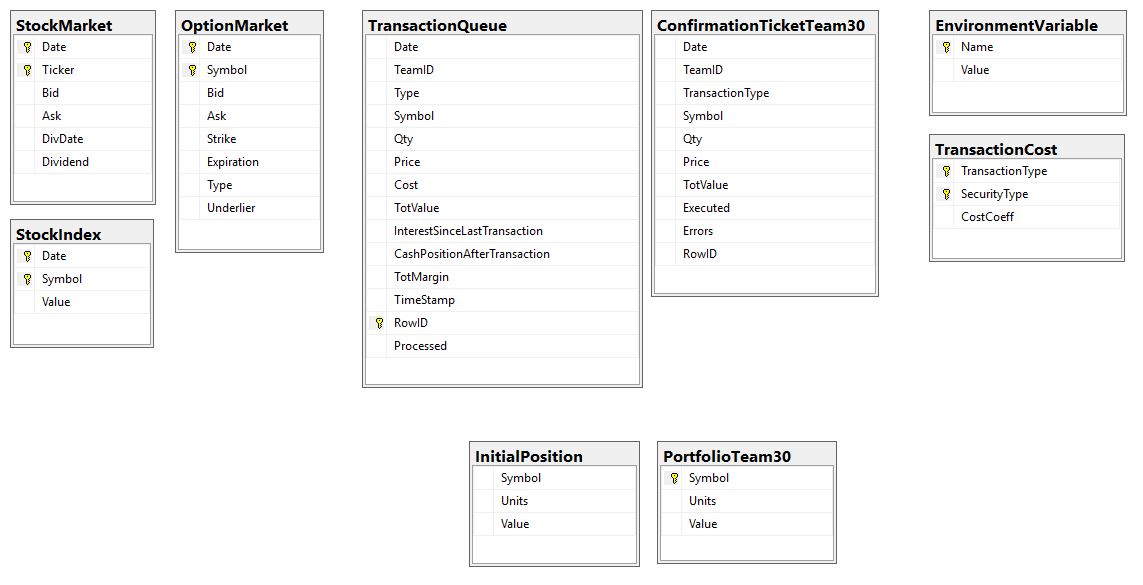
Hints and Tips
- This homework requires DB access (= you may not use the big Shumway lab and most of RRH 300).
- As before and for the remainder of the Spartan Trader series, the videos are strong hints, but not the full solution.
- I see Empty Tables.... is it right? The three DBs contain different datasets: some of the tables may be empty in one or more of them. To verify if your code works properly, you need to check the tables in the DBs. You may use VS for that.
Patches
- For some versions of Excel and VS the required quit button does not suppress the request to save. Copilot
recommends to insert this line of code just before the 'display alerts' line: Globals.ThisWorkbook.Application.EnableEvents
= False
It has worked for at least some students.