Homework H16
Creating transactions
Learning Goals
Creating stock transactions and run compliance checks on them.
Context
“It is time to start thinking about trading,” Stockton declares, appearing at your desk with the momentum of a man delivering breaking
news, “and I have a DAZZLING idea.”
You swivel your chair toward him.
“Building a full trading algorithm from scratch,” he continues, “would be MONUMENTALLY complex. Strategy selection, order sizing,
compliance - A jungle!” He chops the air with his hand.
“So, we simplify.”
You wait.
“We split the problem into two stages.”
He leans over your monitor and begins sketching imaginary architecture in the air.
“Stage one: a trading workstation. Clean interface. Symbol selection. Order sizing and execution. A human trader could sit down and
operate it.”
You nod slowly.
“Stage two,” he continues, raising one finger theatrically, “we add the brain.”
“The algorithm?” you ask.
“EXACTLY! The algorithm will use the workstation the same way a human trader would. It selects symbols. Sizes order. Executes trades. But
instead of fingers on a keyboard-” he taps his temple “-machine intelligence.”
“So you’re suggesting I build the trading functionality first,” you say. “Without worrying yet about whether the operator is a person or
the algorithm.”
Stockton beams.-“PRECISELY! You and I are operating on EXQUISITELY calibrated intellectual wavelengths!”
You’re not entirely convinced about those calibrated wavelengths, but the design logic makes sense: build the trading infrastructure
first, plug intelligence into it later.
You can build that.
“I am on it, Boss.”
Stockton slaps the desk approvingly. “MAGNIFICENT!”
Task
Build a system that satisfies the requirements.
Want to submit as a team? These are are instructions.
Criteria/Requirements
Your work must satisfy the following requirements
- Everything from all previous homework must be implemented correctly
- Assume that for the time being you are teamID 30, even if you already have a teamID assigned
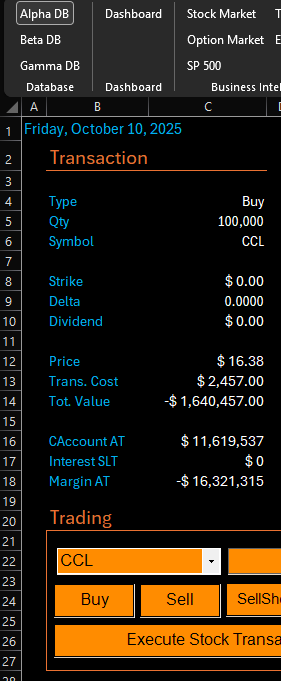
- Compute and visualize: Type, Qty, Symbol, Strike, Dividend, Price, Trans. Cost, Tot. Value, CAccount AT, Interest SLT, Margin AT
- Use this code to model the transactions' effects on margins.
- Make sure that all the values on the dashboard are professionally visualized. 75249221.7224 is hard to read: $ 75,249,221 is much easier.
- Switching databases clears all visualized data, updates the metrics, and brings the user back to the dashboard.
Hints and Tips
- This homework requires DB access (= you may not use the big Shumway lab and most of RRH 300).
- As before and for the remainder of the Spartan Trader series, the videos are strong hints, but not the full solution.
- The video is longer than the past ones, so give yourselves plenty of time. Do not just copy and paste. Figure out what that code does or you will be VERY lost later.
- In class we discussed how to check each metric. Take the time to do it.
- Some tables may be empty or contain different data than in the video. That is OK. Check against the databases.
- Feel free to change the look and feel of your app, provided that the interface is easily understandable by the
grader. You are the developer and the user. You build it the way you like it. You will use it in the Hedge Tournament.
Patches
- In a couple of instances the video showed a message box with a message similar to "MessageBox.Show(MessageBox.Show(" - the repetition is a harmless typo and can be safely deleted.
- Insert the following at the end of the loop that loads the tickers in their CBox: TickersCBox.Text = "Pick a ticker"
- Delete .Trim() from the code behind all the manual stock trade buttons every time you see SelectedItem.Trim()